grandMA3 Plugin
With the FrenschPress plugin for grandMA3, the FrenschPress is set up right on the console: map buttons, encoders and Stream Deck keys — with colours, images, button sets and pages — and save them to the FrenschPress in one step. No browser needed.
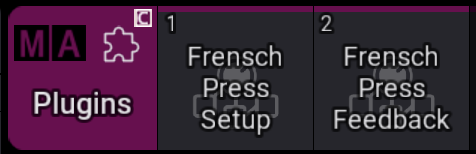
The import creates two entries in the Plugins pool:
| Plugin | Job |
|---|---|
| FrenschPress Setup | The editor: map controls, save, sync, presets and layouts |
| FrenschPress Feedback | Reports executor state to the FrenschPress so buttons light with the console |
Requirements
| FrenschPress | Firmware 1.5.2 or later |
| grandMA3 | Version 2.5.1 or later |
| Network | Console and FrenschPress on the same network and IP range |
| FrenschPress plugin "grandMA3" | Installed on the FrenschPress and up to date (1.8 or later), see Network Targets & Plugins |
| Stream Deck | Optional. Supported: 15-key deck (MK.2) and Stream Deck + |
Installation
The plugin comes as a single download, FrenschPress Plugins.xml. It holds both plugins plus the logo and pool image.
- Copy the file on a USB stick to
gma3_library/datapools/plugins/FrenschPress/— on grandMA3 onPC, to the same folder of the local library. - On the console, go to Show Creator → Import → Plugins and import
FrenschPress Pluginsthere. - FrenschPress Setup and FrenschPress Feedback appear in the pool.
First start: setup assistant
The first time FrenschPress Setup runs in a show, the setup assistant opens.
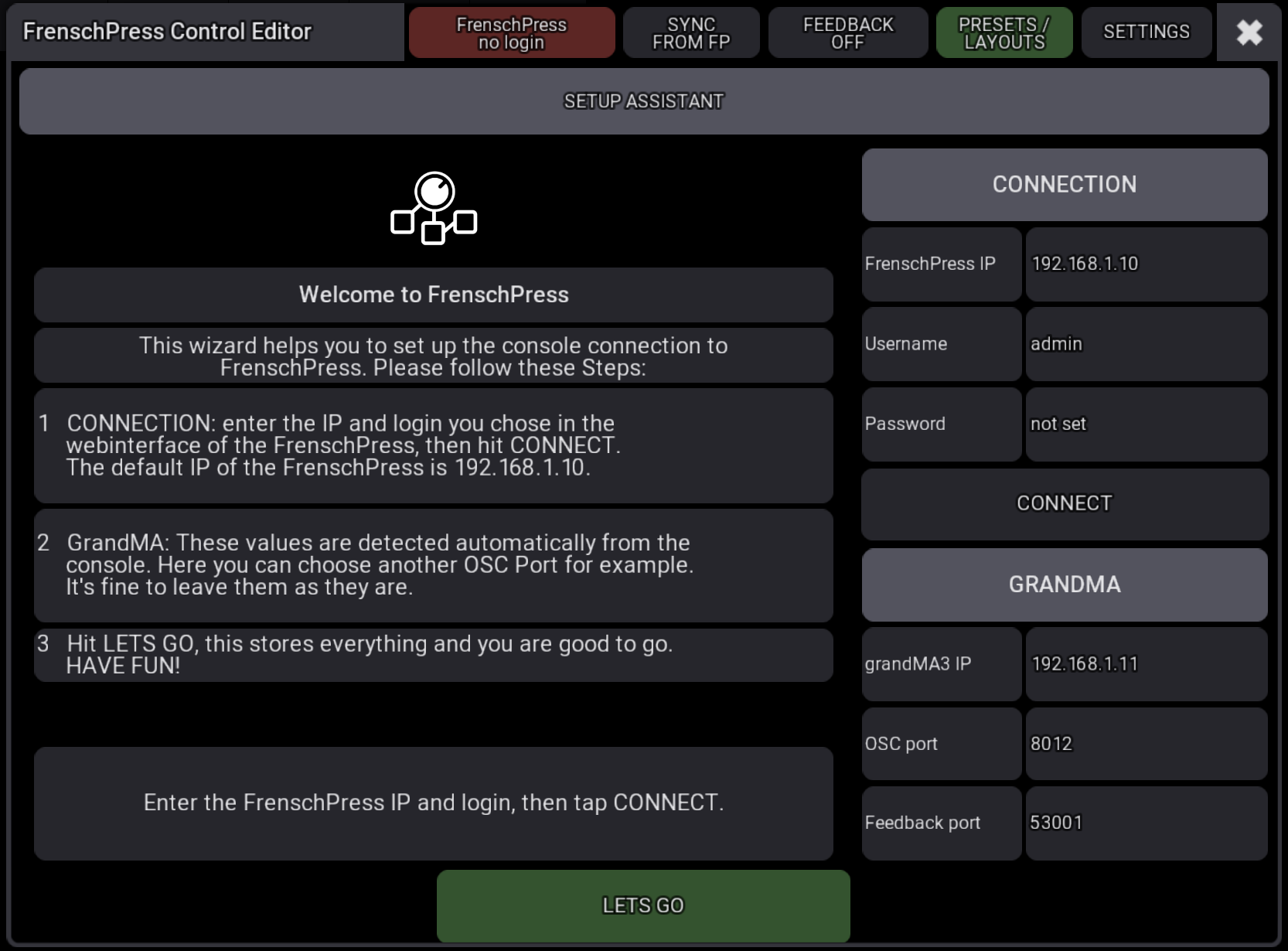
1. CONNECTION
| Field | Meaning |
|---|---|
| FrenschPress IP | Address of the FrenschPress. Factory default 192.168.1.10. |
| Username / Password | The login set in the FrenschPress web interface |
CONNECT checks that the FrenschPress answers and accepts the login. It also reads: the address the console reaches the FrenschPress through, the FrenschPress OSC listen port, the connected Stream Deck model and the active button set. The result shows on the left, green when connected.
2. GRANDMA
| Field | Meaning |
|---|---|
| grandMA3 IP | Console address the FrenschPress sends its commands to — detected automatically; should be in the same IP range |
| OSC port | Port the console receives OSC from the FrenschPress on, default 8012 |
| Feedback port | Port the FrenschPress receives OSC on (its OSC input port, default 53001) — read from the FrenschPress |
These values can usually stay as they are, but may need adjusting in some setups.
3. LETS GO
LETS GO stores everything and sets up:
- the OSC line on the console that the FrenschPress sends commands through,
- the Feedback plugin — it starts right away,
- with a Stream Deck attached: a short press on the TOOLS key opens the editor from then on,
- if the FrenschPress already carries grandMA3 mappings, the editor takes them over.
The editor then opens. Closing the assistant before LETS GO stores nothing, and it comes back next time. SETTINGS → Setup assistant → START opens it again at any time.
The editor
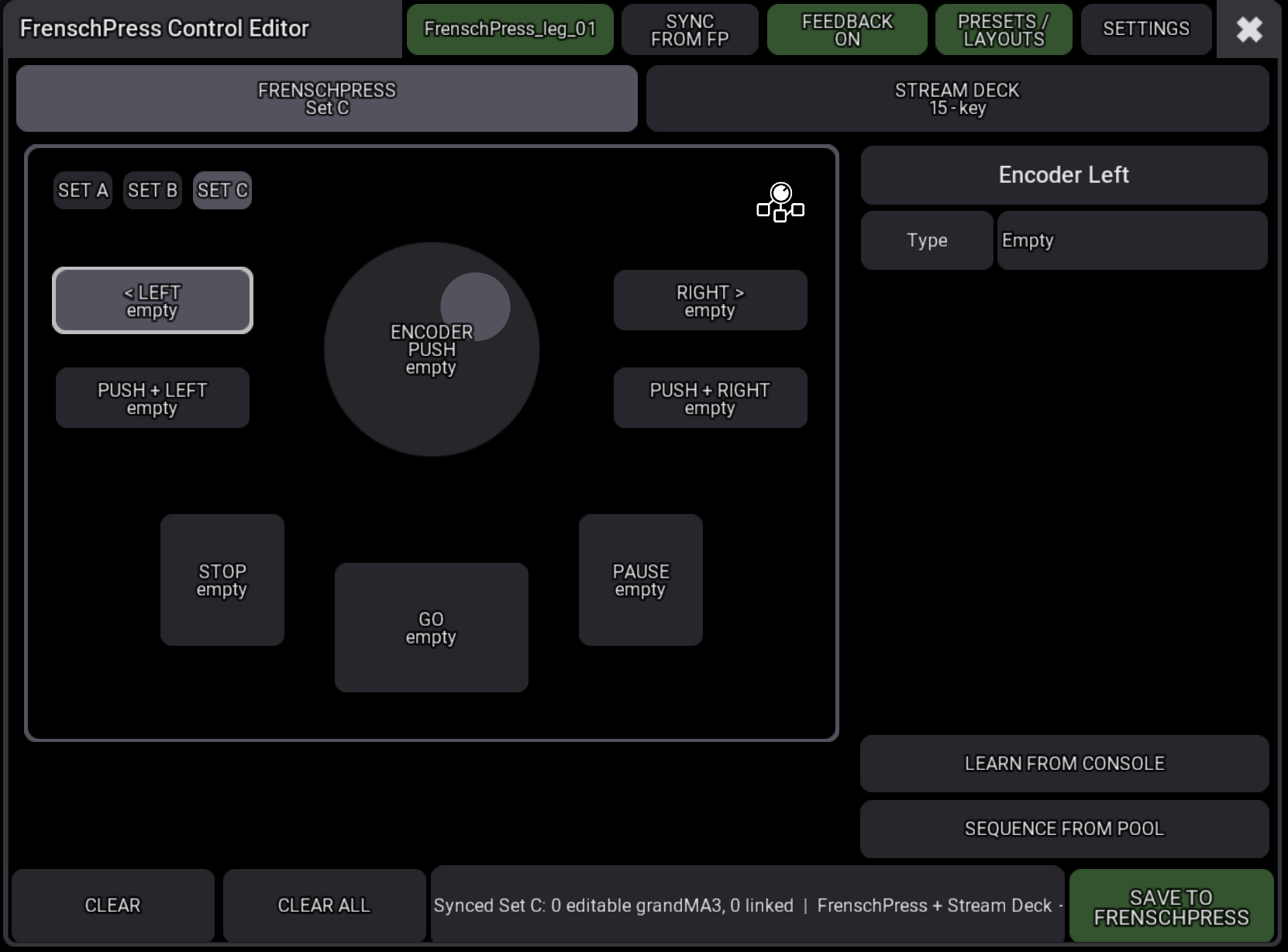
The device picture on the left, the properties of the selected control on the right. Every change is stored in the show at once; it reaches the FrenschPress only with SAVE TO FRENSCHPRESS.
Title bar

| Button | Function |
|---|---|
| Device name | Green with the FrenschPress name while it is reachable; red with no login or NO DEVICE otherwise. Tap to check now. |
| SYNC FROM FP | Reads the shown button set or Stream Deck page from the FrenschPress — see Syncing |
| FEEDBACK ON / OFF | Starts or stops the Feedback plugin. Green: running. |
| PRESETS / LAYOUTS | Presets and Stream Deck layouts on the FrenschPress — see Presets & layouts |
| SETTINGS | Connection, login, Stream Deck model and further settings |
Below it, FRENSCHPRESS (with the active set) and STREAM DECK (with the model) switch between the two views.
FrenschPress view
The eight FrenschPress controls: < LEFT, RIGHT >, PUSH + LEFT, PUSH + RIGHT, ENCODER PUSH, STOP, GO and PAUSE — like the controller view in the web interface.
SET A / SET B / SET C at the top left switch the button set being edited. Each set has its own mapping in the editor. When the FrenschPress is reachable and the password is stored in SETTINGS, the FrenschPress switches its active set along.
Stream Deck view
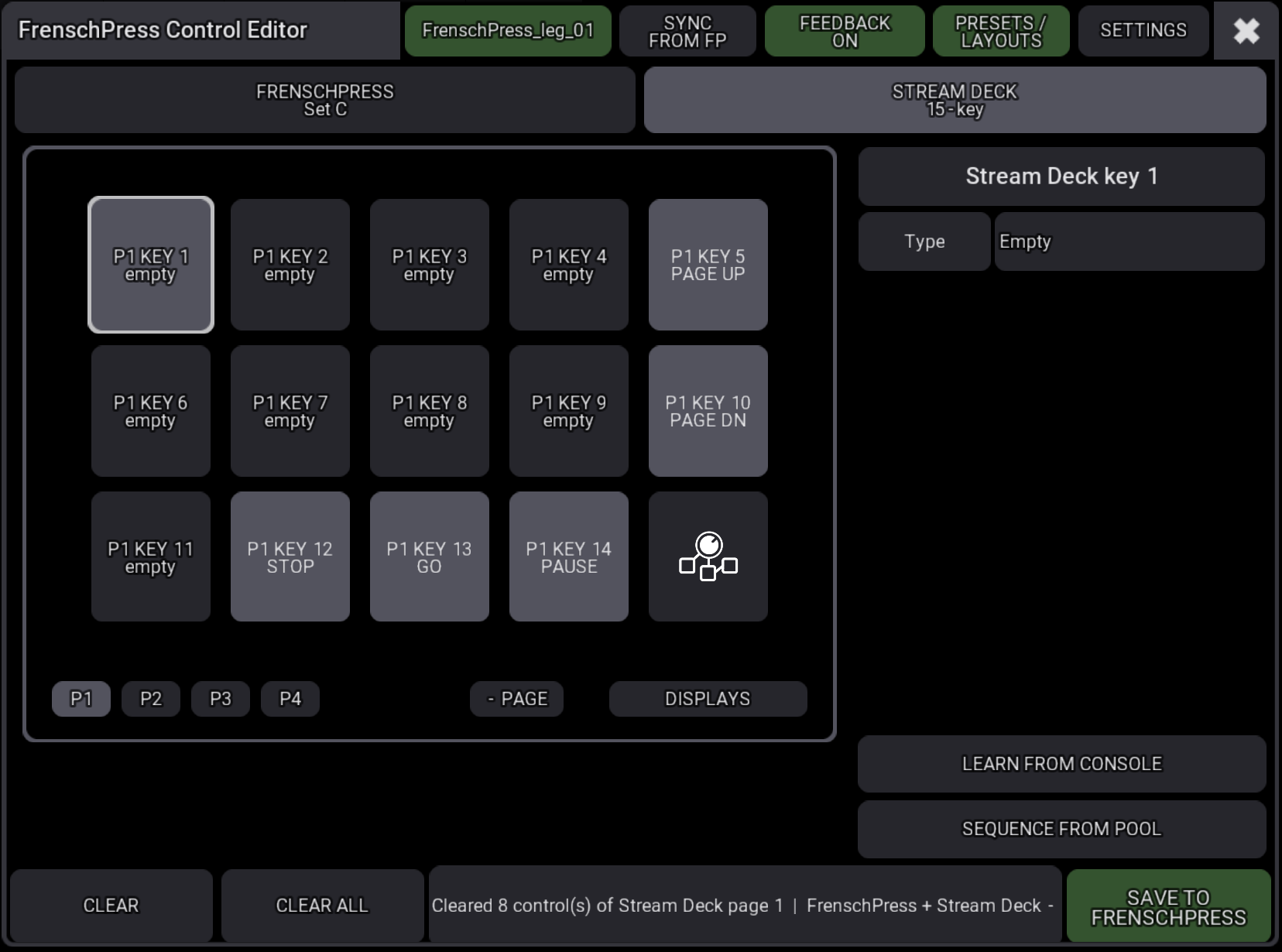
Every key except the reserved TOOLS key can be mapped: keys 1–14 on the 15-key deck, keys 1–7 and the four encoders on the Stream Deck +. Keys carry their page in the name (P1 KEY 1, P2 KEY 1 …).
Grey and locked are keys the FrenschPress uses itself on that page:
PAGE UP/PAGE DN(keys 5 and 10 on the 15-key deck) as soon as the deck has more than one page,TC— the fields of the timecode row,STOP/GO/PAUSEandQLAB— the middle keys of the display rows.
A key that was mapped before keeps its mapping and shows hides ….
| Button (bottom) | Function |
|---|---|
| P1 – P4 | The FrenschPress pages |
| + PAGE | Adds a page on the FrenschPress and selects it |
| - PAGE | After a confirmation, removes the last page on the FrenschPress — with everything mapped on it |
| DISPLAYS | The deck's timecode, STOP/GO/PAUSE and QLab displays: on/off, pages, row. Sent to the FrenschPress at once. |
+ PAGE and - PAGE add a new page or remove the last one.
Mapping a control
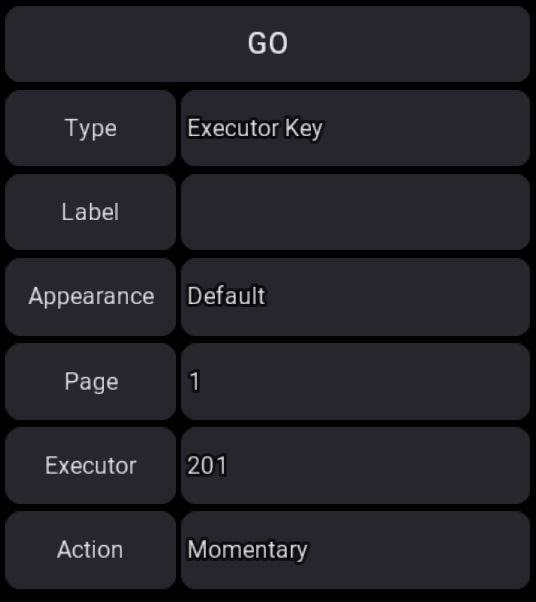
Tap a control — the right side shows only the fields its type needs.
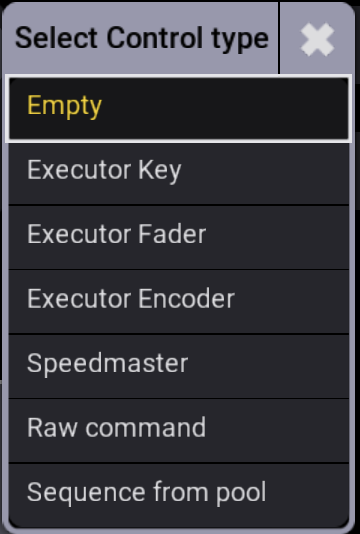
Type
| Type | Fields | Effect |
|---|---|---|
| Empty | — | Not mapped |
| Executor Key | Page, Executor, Action (Momentary or Toggle) | Presses the executor key |
| Executor Fader | Page, Executor, Fader level | Sets the fader to a fixed value (button) or changes it relatively (encoder) |
| Executor Encoder | Page, Executor, Step (−10 … 10) | Turns the executor encoder relatively; minus turns left |
| Speedmaster | Speedmaster, Action (Tap or Set BPM), BPM | Taps the tempo or sets a fixed value |
| Raw command | Command | Any grandMA3 command line |
| Sequence from pool | Sequence, Key function | Places a pool sequence on an executor of the FrenschPress bank |
Plus, for every type:
| Field | Meaning |
|---|---|
| Label | Macro name on the FrenschPress and Stream Deck key text. Empty: the type name or the sequence name. |
| Appearance | Colour and image from the console's Appearance pool — see Colours and images |
XKeys
The executor field takes a number or an XKey. Tap it for the list X1 – X16, or type X5. grandMA3 treats XKeys as page executors (X1–X8 = 291–298, X9–X16 = 191–198); the editor shows them as 295 (X5).
Learn from console
LEARN FROM CONSOLE waits 15 seconds for something to happen on the console; tap it again to cancel.
| On the console | Result |
|---|---|
| Press an executor key or XKey | Executor Key |
| Move a fader | Executor Fader at the new level |
Move a fader or encoder — on a turn control (< LEFT, RIGHT >, PUSH + …, Stream Deck + encoder) | Executor Encoder turning the same way |
Learn watches the currently selected executor page. When a sequence sits on several executors, the lowest number is taken and the status line says so.
Sequence from pool
SEQUENCE FROM POOL (or type Sequence from pool) lists the show's sequences, then the key function: Go+, Go-, Pause, Toggle, Flash, Temp, Swap, On, Off, Top or Select.
The plugin places the sequence on an executor of the FrenschPress bank — an executor page of its own (default 999, named "FrenschPress") — and sets its key function there. The FrenschPress button then behaves exactly like the console key, including Flash and Temp on release, and lights while the executor runs.
The page is created on first use. If the show already uses that page number for something else, the plugin refuses — pick another number under SETTINGS → Bank page.
CLEAR and CLEAR ALL
| Button | Effect |
|---|---|
| CLEAR | Resets the selected control to Empty |
| CLEAR ALL | After a confirmation, resets every control of the shown set or deck page to Empty |
Both reach the FrenschPress with the next save.
Colours and images
The Appearance drives the colours on the FrenschPress and the Stream Deck. Tap it for the console's appearance list; New appearance… creates one, Edit … opens the chosen one in grandMA3's appearance editor.
| Target | Effect |
|---|---|
| STOP / GO / PAUSE | The LED takes the appearance's rest colour for the saved set and lights at full brightness in the same hue on feedback. |
| Stream Deck key | Appearance back colour = active, appearance colour = rest. With the colour left at grandMA3 white, the key shows the back colour at 40 % at rest. |
| Appearance with an image | The image (grandMA3 symbol or show image) goes on the Stream Deck key without text, tinted as grandMA3 draws it — full brightness on feedback, 55 % at rest. |
The plugin renders images on the console when saving, about 1–3 seconds per image; progress is shown. Unchanged images are not sent again. Keys given an image in the web interface are left alone.
Saving
SAVE TO FRENSCHPRESS (bottom right) writes the mapping to the FrenschPress:
- always the FrenschPress buttons and encoder,
- with a Stream Deck attached, also the deck page selected in the editor.
Without a stored password the plugin asks for it. The button is green only while a FrenschPress is reachable.
The plugin only replaces macros it created itself. Other macros on the FrenschPress — e.g. from the web interface — show in the editor as linked, read-only controls with their name and survive a save. Clearing or replacing one asks first.
The save goes to the page the deck currently shows. If the deck is paged meanwhile, the plugin reports it — leave the deck on the edited page and save again.
Syncing
On opening and with SYNC FROM FP, the editor reads the mapping from the FrenschPress:
- grandMA3 macros (executor, fader, speedmaster, command, bank sequence) become editable controls again, appearance included. If the show lacks the appearance, the plugin recreates it.
- Other macros show as linked controls.
- Unsaved edits in the editor are confirmed first.
The editor follows the FrenschPress: when the button set or page is changed on the device or the deck, the editor follows within a few seconds.
Presets & layouts
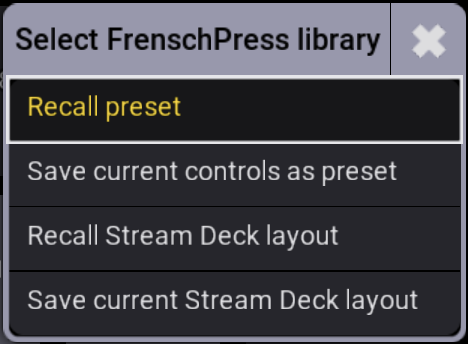
| Entry | Function |
|---|---|
| Recall preset | Load a FrenschPress preset — into all sets or only Set A, B or C |
| Save current controls as preset | Save all three sets of the editor as a new preset on the FrenschPress |
| Recall Stream Deck layout | Load a saved layout for the connected deck |
| Save current Stream Deck layout | Save the current deck mapping as a layout under a new name |
Feedback
FrenschPress Feedback reports the console's state to the FrenschPress:
- Executor keys light while their executor runs.
- Fader mappings light while the fader is above 0.
- Speedmaster keys blink in the speedmaster's tempo.
This applies to the FrenschPress buttons and the Stream Deck. Start and stop it with FEEDBACK in the editor's title bar. Feedback sends to FrenschPress IP on the Feedback port from SETTINGS. If that differs from the OSC port, it creates its own OSC line FrenschPress Feedback; the command line stays untouched.
Several FrenschPress units can share one console — each gets its own feedback.
Macros created in the web interface with the FrenschPress plugin grandMA3 get feedback too. After that plugin is updated on the FrenschPress, open and save such macros once more.
TOOLS key opens the editor
With a Stream Deck attached, a short press on the TOOLS key opens the editor on the console. Holding it still opens the on-deck menu. On a deck with several pages but no PAGE keys, the short press still steps through the pages.
Switch it on and off under SETTINGS → TOOLS opens Setup. The console's OSC line needs Receive Command on — the setup assistant sets that up.
SETTINGS
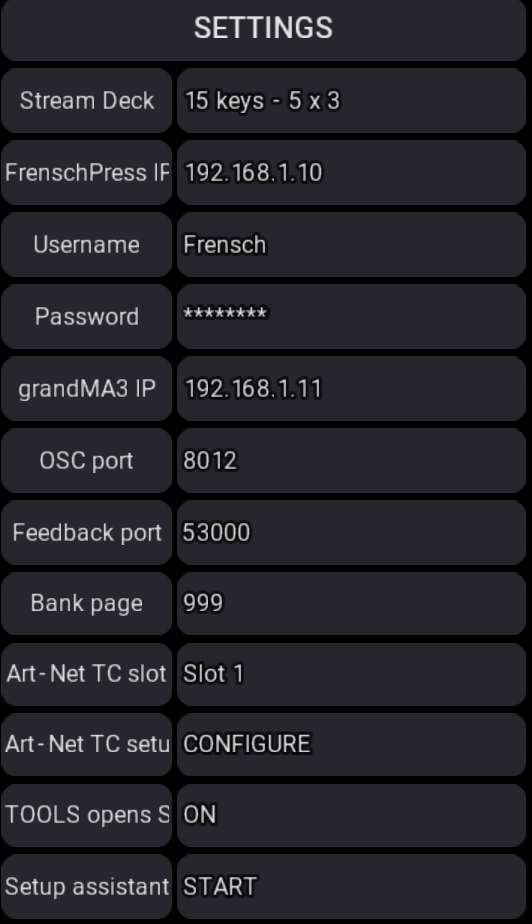
| Field | Meaning |
|---|---|
| Stream Deck | Model for the deck view: 15 keys - 5 x 3 or Plus - 8 keys + 4 encoders. Saving checks that the connected deck matches. |
| FrenschPress IP | Address of the FrenschPress |
| Username / Password | FrenschPress login. With a stored password, saving and set changes no longer ask. |
| grandMA3 IP | Console address for the FrenschPress's commands |
| OSC port | Port the console receives commands on (default 8012) |
| Feedback port | FrenschPress OSC input port (default 53001). Tap to read it from the FrenschPress. |
| Bank page | Executor page of the FrenschPress bank, default 999 |
| Art-Net TC slot / Art-Net TC setup | See Art-Net timecode |
| TOOLS opens Setup | A short press on the TOOLS key opens the editor — see above |
| Setup assistant | START opens the setup assistant again |
The password is stored in plain text in the show's user variables. Leave the field empty in shows that are passed on.
Art-Net timecode
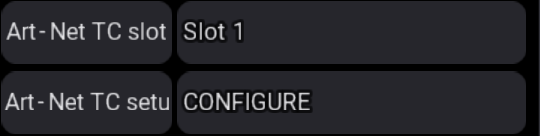
Art-Net TC setup → CONFIGURE sets up both sides after one confirmation, so grandMA3 receives the FrenschPress Art-Net timecode:
- on the FrenschPress, Art-Net timecode is switched on,
- on the console, Art-Net input, the interface and an input for Stream ID 0 are set up and assigned to the chosen Art-Net TC slot; the slot is then named
FrenschPress.
Finally grandMA3's Art-Net interface list opens. Pick the interface there once — grandMA3 onPC binds Art-Net reception only then.
Troubleshooting
| Problem | Fix |
|---|---|
Title bar red / NO DEVICE | Check IP and network; the FrenschPress must be reachable on port 80. Tap to check now. |
| Buttons do nothing on the console | Check the console's OSC line: UDP, Input and Receive Command on, port as OSC port in SETTINGS. Without Send Command, grandMA3 2.5 reports Illegal Property. Easiest: run the setup assistant again. |
| Buttons don't light | FEEDBACK must be green. Tap Feedback port so it is read from the FrenschPress. |
| "Bank page" is refused | The page is already used in the show — pick a free number in SETTINGS. |
| Deck mapping lands on the wrong page | Don't page the deck while saving, and save again. |